Exterior House Paint Visualizer

Compare a new siding, trim or front-door color on a photo of your own house. Choose a target color and specify which surface to repaint.

Try a color on your house photo

Upload a photoJPG, PNG or WebP · Up to 10 MB
Standard 1K · 5 credits

What You Can Preview: Siding, Trim, Front Door, Garage Door

  • Siding

    Stand far enough back to include one complete elevation, with a strip of roof above it and the ground below. Those two edges help you judge how much of the view the new color will occupy. Horizontal boards, shingles and smooth render catch light differently. Pick a photo that shows some of that texture. If one end of the house sits in shade, leave it in the picture. You will want to see how the proposed color looks as it crosses that line.

  • Trim

    Window casings and corner boards take up very little space in a street view. Move closer for this test, keeping at least one whole window, a section of siding and the eave in frame. Look at the junction between the casing and the window sash. A charcoal surround next to a white sash produces two outlines. Decide whether you like that detail before repeating the treatment around every opening on the house.

  • Front door

    Photograph the entrance with the door closed. An open doorway reads as a dark rectangle and gives the model very little painted surface to work with. Include the jamb, threshold, hardware and a little of the porch floor. A red door that looks bright on a sample card can look quiet under a deep porch. Keep that shadow in the picture and compare the proposed finish with the brick, stone or decking immediately beside it.

  • Garage door

    Take the image from a position where you can see the entire door and its surround. Move parked vehicles out of the frame if possible. The width of a double garage makes even a pale color a large part of the composition. Try a tone close to the siding, then compare it with a stronger contrast. Look from the driveway entrance and decide where your eye lands first, particularly if the front door is set farther back.

Before and After on Real Facades

These three AI paint studies start with the same front view of a white clapboard house. Follow the two windows, the brick chimney and the timber walk between images to orient yourself. Each pair includes the starting photo and one edit. Open the prompt beneath a pair to see which surface was selected and which details the edit was asked to keep.

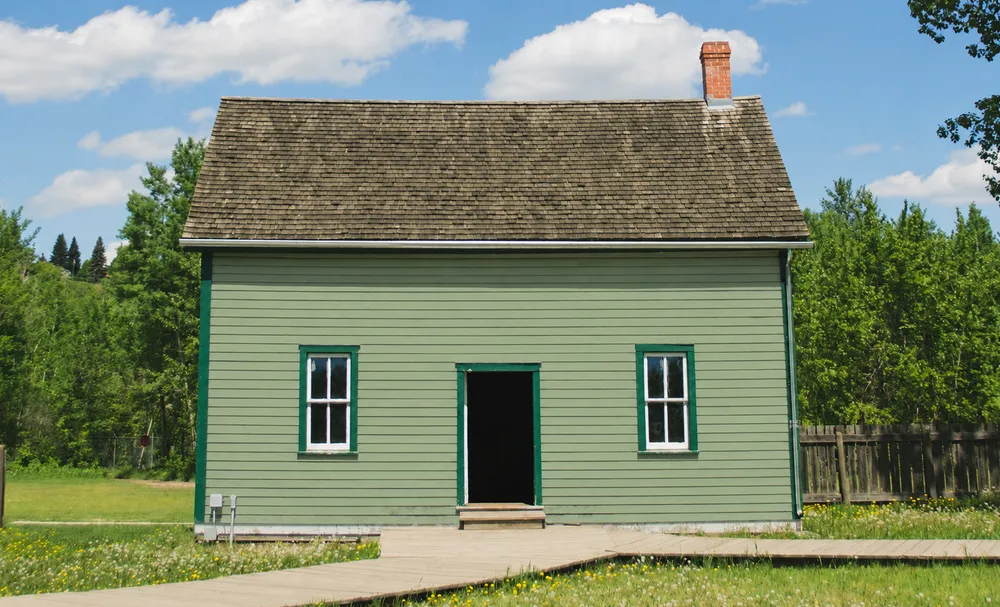
Sage siding beside green window trim
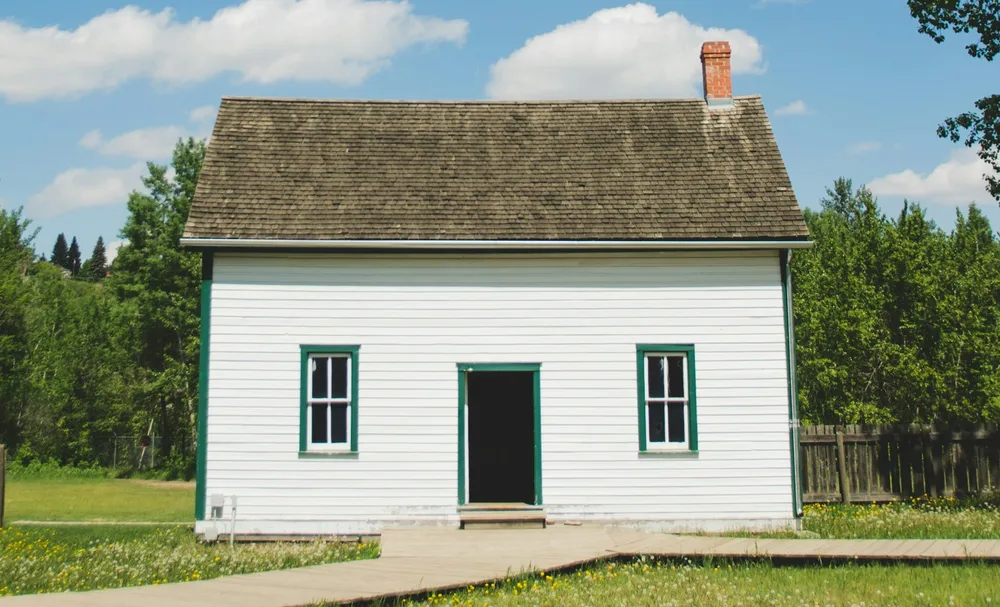
Original white siding and green trim
Sage siding beside green window trim

The sage boards bring the wall closer in color to the trees. The dark green casings still trace the windows, although their edges stand out less than they did against white. Compare the broad sunlit band between the windows with the narrow shaded strip under the gutter. This is a useful study if your roof and landscaping already carry several shades of green.

Read the original edit prompt

Repaint only the white horizontal siding in muted sage green. Preserve the green trim, roof, chimney, open doorway, windows, shadows, grass, boardwalk, sky, camera angle and crop. Return one photorealistic facade image with no labels.
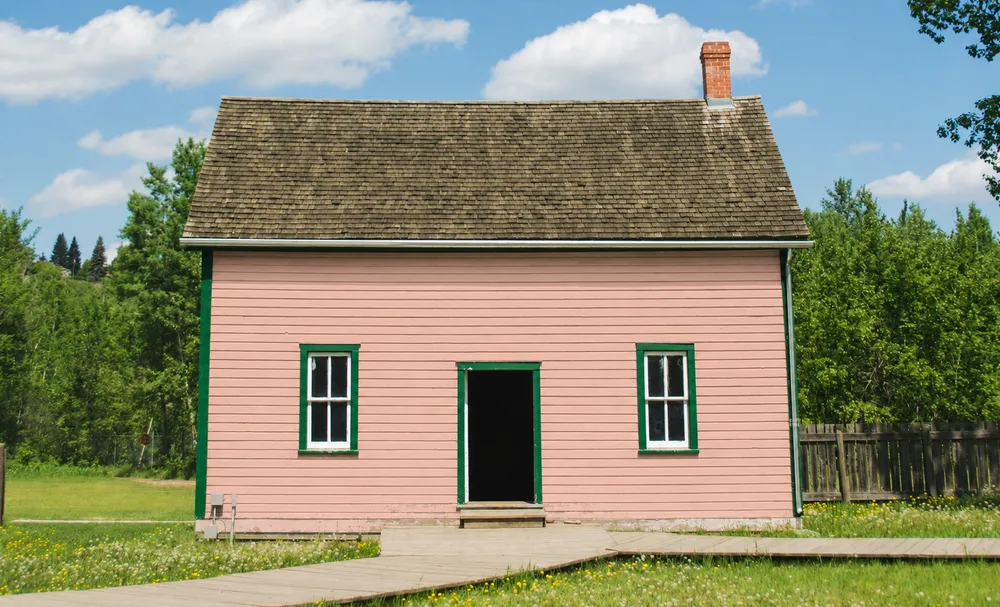
Pale clay siding under a weathered roof

Original white siding and green trim
Pale clay siding under a weathered roof

A warm clay wall puts the chimney and the horizontal boards into the same color family. Use the brick as a reference when you move between the two images. Then look at the green casing by the entry. Its contrast with the surrounding boards is a separate decision from the way the new siding works with the roof. You can keep one combination and revisit the other.

Read the original edit prompt

Repaint only the white horizontal siding in a pale clay pink. Retain the original board texture and shadows. Preserve the green trim, roof, chimney, doorway, windows, sky, grass, boardwalk and exact framing. Return one photorealistic facade image with no labels.

Charcoal frames with the white siding retained

Original white siding and green trim
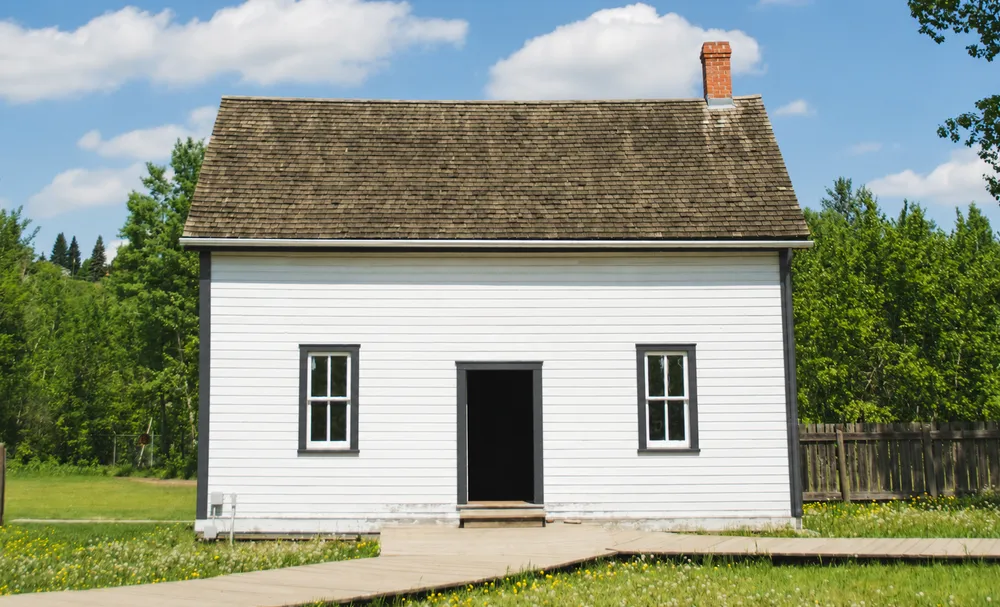
Charcoal frames with the white siding retained

Here the large wall stays white. Follow the trim down the corners and around the two front windows to see how much can change with a narrow band of paint. The white sashes remain visible inside the darker outline. If you are choosing between a full repaint and a smaller weekend project, look at this pair first and judge the effect from across the room.

Read the original edit prompt

Repaint only the green exterior trim around the two windows, doorway and outer corners in charcoal gray. Keep white siding, white window sashes, roof, chimney, open doorway, path and landscape unchanged. Match the original framing and light. Return one photorealistic facade image with no labels.

How It Works in Three Steps

  1. Choose a starting view you can repeat

    Upload a JPG, PNG or WebP showing the surface in daylight. A straight view generally works for a front elevation. A slight angle is more revealing when you need to see a recessed porch or the return wall beside a garage. Keep a copy of this exact file for every color in the first comparison. If you also want an evening view, run a separate series from an evening photo.

  2. Set the surface and the target color

    Select siding, trim, front door or garage door in the tool above. Open the color picker and choose a target. Write down its HEX value with the image name so you can recognize it later. Start with one surface per preview. This makes it easier to tell whether your response comes from the color itself, the size of the area covered, or the contrast with the surface next to it.

  3. Generate, inspect and save your shortlist

    Sign in to generate the preview. The button shows the credit cost before you run it. Compare the result with your source and inspect the roof, window openings and landscaping for incidental changes. Download a candidate you want to keep. Choose another color with the same photo, then compare the saved images at the same size. Two clearly different candidates usually make the next decision easier than several almost identical ones.

Curb Appeal Checklist Before You Commit

  • Start at the entry

    Try the accent color on the front door first. View it beside the frame and porch floor, then step back to the street before deciding whether to use it across a whole wall.

  • Check the sample on more than one side

    Hold a large painted sample beside the siding, upright in the same plane. Move it from an exposed wall to a sheltered one and return at a different time of day. A deep tone can swallow the lines between boards in shade, while the same boards show distinct edges in direct sun. Note the exposure of each wall when you label your tests.

  • Use the fixed finishes as references

    Hold each candidate beside the roof tiles, brickwork and window frames you plan to keep. A cream that suits the timber porch may look yellow against a cool gray foundation. Give the most visible junctions priority.

  • Record the final choice at the house

    Bring your two preferred previews to the paint counter and ask for samples in an exterior finish. Compare the painted boards outside. Give your painter the winning board, marked with the product name, color code, sheen and intended surface.

Exterior House Paint Visualizer FAQ

Can I change just the front door?

Yes. Select Front door and upload a view that shows the closed door from top to bottom. After generating, compare the frame, hardware and neighboring wall with the source. If the model picks up a nearby shutter or sidelight, try a closer photo that still includes the boundary around the door.

How many colors can I compare?

You can run successive previews as your credit balance allows. Each run takes one target color. Download the first result, choose Try another, then change the color and use the same starting image. Giving the saved files descriptive names makes it easier to revisit them after you have seen physical samples.

Is it free to try?

You can upload a photo and choose colors before signing in. New accounts receive starter credits. A standard preview on this page uses 5 credits. Check your remaining balance before generating several alternatives and save each result you want to discuss.

Will a screen preview match the paint I buy?

Use it to choose a color family and the amount of contrast you like. Camera exposure, white balance, screen brightness and reflections from nearby surfaces all affect the appearance. Take the shortlisted colors outside and look at actual paint on a sample board in the intended finish before ordering a full quantity.

How do I try a two-tone scheme?

Start with the larger area, such as the siding, and save that result. Upload the saved preview as your next starting image, select trim or front door, and try the accent color. Compare the second result with both the intermediate preview and the original photograph so you can see which details changed in each pass.

Test interior wall colors